Yep, we may get a tiny thank-you (read: commission) when you buy through
links on Autologr — not enough for a yacht, but enough to keep the lights (and
servers) on.
Learn more
What makes the XTRONS DVR025S click with car owners? It’s got 126 specs & performance worth checking out — we start with front camera resolution, loop recording, intended vehicle type & emergency recording.
A fast snapshot of the XTRONS DVR025S, covering its standout specification and what you can expect right out of the box.
XTRONS DVR025S
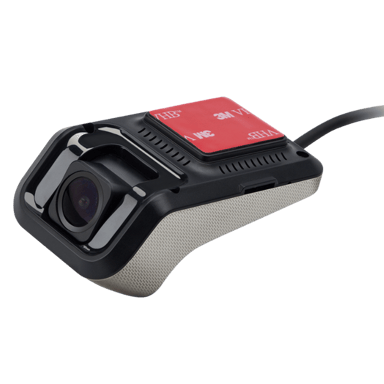
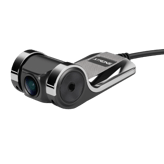
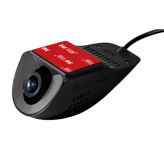
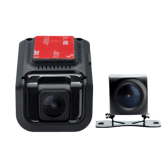
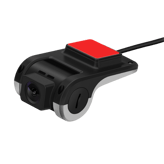
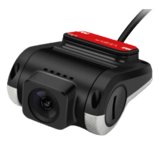
XTRONS DVR025S is a compact and discreet dash cam designed to integrate seamlessly with Android head units for a clean, hidden installation. It records in Full HD 1080p with a wide 140° viewing angle, helping capture essential road details while minimizing blind spots. With loop recording and simple plug-and-play functionality, it offers a reliable and low-maintenance solution for everyday driving.
Quick Specs Breakdown
The key specs that actually matter—no fluff, no guesswork
Here’s a streamlined view of the XTRONS DVR025S key specifications. Compare critical features at a glance before exploring the full specs and hands-on insights below.
Video & Recording Performance
Front Camera Resolution
What is the front camera resolution?
1080p
Loop Recording
Does it support loop recording?
Yes
Emergency Recording
Is emergency recording supported?
Yes
Night Vision Mode
Does it have night vision?
Yes
Parking Recording Mode
Does it record while parked?
Yes
General Information
Intended Vehicle Type
What vehicles is it intended for?
Car,SUV,Truck,Van,Rideshare Vehicle
Device Type
What type of device is this?
Dash Cam
Camera Configuration
What camera configuration does it use?
Front
Expandable Storage
Does it support expandable storage?
Yes
Safety, Security & Parking Protection
Collision Detection
Does it detect collisions?
Yes
G-Sensor
Does it have a G-sensor?
Yes
Power, Battery & Charging
Charging Method
How is the dash cam charged?
USB
Supercapacitor
Does it support a supercapacitor?
Yes
Storage & File Management
Maximum Supported Storage
What is the maximum supported storage?
128 GB
Maintenance, Updates & Ownership
Warranty Length
What is the warranty length?
1 year
Specifications & Facts
126
Specs measured. Drama avoided.
Is the XTRONS DVR025S the best choice in its class? You’ll find out here with full specs, comparisons to similar dash cams, and opinions from the community.
Dash Cam in this range
Who knows?
(Help us out by suggesting one!)
Indicates whether storage capacity can be expanded.
Don’t keep it to yourself — be the first to react and review the
Expandable Storage on XTRONS DVR025S
◉ and help others decide!
XTRONS DVR025S
Installation Location
Where is the dash cam installed?
0
XTRONS DVR025S
0
Votes
Front Windshield
Dash Cam in this range
Who knows?
(Help us out by suggesting one!)
XTRONS DVR025S
The recommended installation location is the Front Windshield, providing an unobstructed forward view for incident capture.
Mounting at the front windshield also maximizes the effectiveness of driver-facing sensors and lane-related features when present.
Indicates the physical installation position inside the vehicle.
Don’t keep it to yourself — be the first to react and review the
Installation Location on XTRONS DVR025S
◉ and help others decide!
XTRONS DVR025S
Operating Mode
How does the dash cam operate?
0
XTRONS DVR025S
0
Votes
App-Controlled
Dash Cam in this range
Who knows?
(Help us out by suggesting one!)
XTRONS DVR025S
The device is App-Controlled, meaning setup, live view, and many settings are managed through a companion smartphone app.
App control makes firmware updates and video downloads convenient without removing the microSD card.
Describes how the dash cam operates and is managed.
Don’t keep it to yourself — be the first to react and review the
Operating Mode on XTRONS DVR025S
◉ and help others decide!
XTRONS DVR025S
Operating Temperature Range
What temperature range does it support?
0
XTRONS DVR025S
0
Votes
-4°F to 158°F
Dash Cam in this range
Who knows?
(Help us out by suggesting one!)
XTRONS DVR025S
Rated operating temperatures range from -4°F to 158°F, equivalent to approximately -20°C to 70°C, so the unit is designed to tolerate wide temperature extremes.
This range covers most climate conditions a vehicle may experience, including hot interiors and cold starts.
Defines the temperature range where the dash cam operates reliably.
Don’t keep it to yourself — be the first to react and review the
Operating Temperature Range on XTRONS DVR025S
◉ and help others decide!
XTRONS DVR025S
Mounting Type
How is the dash cam mounted?
0
XTRONS DVR025S
0
Votes
Dashboard
Dash Cam in this range
Who knows?
(Help us out by suggesting one!)
Describes where and how the dash cam is mounted in the vehicle.
Don’t keep it to yourself — be the first to react and review the
Mounting Type on XTRONS DVR025S
◉ and help others decide!
XTRONS DVR025S
Storage Media Type
What storage media does it use?
0
XTRONS DVR025S
0
Votes
microSD
Dash Cam in this range
Who knows?
(Help us out by suggesting one!)
Specifies the type of storage media used to record video footage.
Don’t keep it to yourself — be the first to react and review the
Storage Media Type on XTRONS DVR025S
◉ and help others decide!
Dash Cam in this range
Who knows?
(Help us out by suggesting one!)
Enables recording while the vehicle is parked.
Don’t keep it to yourself — be the first to react and review the
Parking Recording Mode on XTRONS DVR025S
◉ and help others decide!
XTRONS DVR025S
Front Frame Rate
What is the front camera frame rate?
30
Hz
0Votes
Dash Cam in this range
Who knows?
(Help us out by suggesting one!)
XTRONS DVR025S
The front camera records at 30 Hz (frames per second), which delivers smooth motion for typical driving conditions.
Thirty frames per second balances motion clarity and file size for continuous recording.
Measures how smoothly the front camera records motion.
Don’t keep it to yourself — be the first to react and review the
Front Frame Rate on XTRONS DVR025S
◉ and help others decide!
XTRONS DVR025S
Low-Light Enhancement
Is low-light enhanced?
Yes
0Votes
XTRONS DVR025S
Dash Cam in this range
Who knows?
(Help us out by suggesting one!)
XTRONS DVR025S
Low-light enhancement is enabled to improve image clarity in dim conditions.
Expect brighter, clearer nighttime footage compared with units lacking this feature.
Improves video clarity in dark environments.
Don’t keep it to yourself — be the first to react and review the
Low-Light Enhancement on XTRONS DVR025S
◉ and help others decide!
XTRONS DVR025S
Event Video Length
How long are event recordings?
0
XTRONS DVR025S
0
Votes
1–3 Minutes
Dash Cam in this range
Who knows?
(Help us out by suggesting one!)
XTRONS DVR025S
Event clips are typically saved in segments of 1–3 Minutes, sufficient to cover an incident's lead-up and aftermath.
Length helps balance between capturing context and conserving storage.
Defines the duration of automatically saved event recordings.
Don’t keep it to yourself — be the first to react and review the
Event Video Length on XTRONS DVR025S
◉ and help others decide!
XTRONS DVR025S
Recording Delay After Ignition
How long does recording continue after ignition off?
0
XTRONS DVR025S
0
Votes
5–10 Seconds
Dash Cam in this range
Who knows?
(Help us out by suggesting one!)
XTRONS DVR025S
There is a 5–10 Seconds recording delay after ignition before continuous recording starts, allowing time for boot and initialization.
This brief delay is normal and ensures the system stabilizes before full recording begins.
Specifies how long recording continues after the engine is turned off.
Don’t keep it to yourself — be the first to react and review the
Recording Delay After Ignition on XTRONS DVR025S
◉ and help others decide!
XTRONS DVR025S
Video Codec
What video codec is used?
0
XTRONS DVR025S
0
Votes
H.264
Dash Cam in this range
Who knows?
(Help us out by suggesting one!)
Defines the compression format used for video files.
Don’t keep it to yourself — be the first to react and review the
Video Codec on XTRONS DVR025S
◉ and help others decide!
XTRONS DVR025S
HDR
Does it support HDR?
Yes
0Votes
XTRONS DVR025S
Dash Cam in this range
Who knows?
(Help us out by suggesting one!)
Indicates support for High Dynamic Range video.
Don’t keep it to yourself — be the first to react and review the
HDR on XTRONS DVR025S
◉ and help others decide!
XTRONS DVR025S
WDR
Does it support WDR?
Yes
0Votes
XTRONS DVR025S
Dash Cam in this range
Who knows?
(Help us out by suggesting one!)
Enhances visibility in mixed lighting conditions.
Don’t keep it to yourself — be the first to react and review the
WDR on XTRONS DVR025S
◉ and help others decide!
XTRONS DVR025S
Infrared Night Vision
Does it support infrared night vision?
No
0Votes
XTRONS DVR025S
Dash Cam in this range
Who knows?
(Help us out by suggesting one!)
Uses infrared LEDs for interior or low-light recording.
Don’t keep it to yourself — be the first to react and review the
Infrared Night Vision on XTRONS DVR025S
◉ and help others decide!
XTRONS DVR025S
Continuous Recording
Can it record continuously?
Yes
0Votes
XTRONS DVR025S
Dash Cam in this range
Who knows?
(Help us out by suggesting one!)
Indicates support for uninterrupted recording sessions.
Don’t keep it to yourself — be the first to react and review the
Continuous Recording on XTRONS DVR025S
◉ and help others decide!
XTRONS DVR025S
Dual Recording
Does it support dual recording?
No
0Votes
XTRONS DVR025S
Dash Cam in this range
Who knows?
(Help us out by suggesting one!)
Allows simultaneous front and rear recording.
Don’t keep it to yourself — be the first to react and review the
Dual Recording on XTRONS DVR025S
◉ and help others decide!
XTRONS DVR025S
Triple Channel Recording
Does it support triple recording?
No
0Votes
XTRONS DVR025S
Dash Cam in this range
Who knows?
(Help us out by suggesting one!)
Supports front, rear, and interior recording together.
Don’t keep it to yourself — be the first to react and review the
Triple Channel Recording on XTRONS DVR025S
◉ and help others decide!
XTRONS DVR025S
Time-Lapse Recording
Is time-lapse recording available?
No
0Votes
XTRONS DVR025S
Dash Cam in this range
Who knows?
(Help us out by suggesting one!)
Captures frames at intervals to save storage.
Don’t keep it to yourself — be the first to react and review the
Time-Lapse Recording on XTRONS DVR025S
◉ and help others decide!
XTRONS DVR025S
Audio Recording
Does it record audio?
Yes
0Votes
XTRONS DVR025S
Dash Cam in this range
Who knows?
(Help us out by suggesting one!)
Captures in-cabin audio alongside video.
Don’t keep it to yourself — be the first to react and review the
Audio Recording on XTRONS DVR025S
◉ and help others decide!
XTRONS DVR025S
Audio Recording Disable Option
Can audio recording be disabled?
Yes
0Votes
XTRONS DVR025S
Dash Cam in this range
Who knows?
(Help us out by suggesting one!)
Allows users to turn off audio recording.
Don’t keep it to yourself — be the first to react and review the
Audio Recording Disable Option on XTRONS DVR025S
◉ and help others decide!
Camera & Lens System
11
XTRONS DVR025S
Front Lens Field of View
What is the front lens field of view?
140
degree
0Votes
Dash Cam in this range
Who knows?
(Help us out by suggesting one!)
XTRONS DVR025S
The front lens has a field of view of 140 degree, offering a wide coverage suitable for capturing multiple lanes and roadside details.
A 140° FOV balances peripheral coverage with reduced edge distortion compared to ultra-wide optics.
Indicates how wide the front camera can capture the road.
Don’t keep it to yourself — be the first to react and review the
Front Lens Field of View on XTRONS DVR025S
◉ and help others decide!
XTRONS DVR025S
Lens Type
What type of lens is used?
0
XTRONS DVR025S
0
Votes
Glass
Dash Cam in this range
Who knows?
(Help us out by suggesting one!)
XTRONS DVR025S
The lens construction is Glass, which generally provides sharper imagery and better durability compared with plastic elements.
Glass elements can reduce optical distortion and improve clarity, especially in varied lighting.
Specifies the material and construction of the lens.
Don’t keep it to yourself — be the first to react and review the
Lens Type on XTRONS DVR025S
◉ and help others decide!
XTRONS DVR025S
Focus Type
What focus type does it use?
0
XTRONS DVR025S
0
Votes
Fixed
Dash Cam in this range
Who knows?
(Help us out by suggesting one!)
XTRONS DVR025S
The lens uses a fixed focus system, indicated by Fixed, which requires no user focus adjustments and is optimized for typical driving distances.
Fixed-focus designs are compact and reliable for dash-cam use but are less suited to tasks needing close-up focusing.
Describes how the camera focuses on objects.
Don’t keep it to yourself — be the first to react and review the
Focus Type on XTRONS DVR025S
◉ and help others decide!
XTRONS DVR025S
Sensor Type
What sensor type is used?
0
XTRONS DVR025S
0
Votes
CMOS
Dash Cam in this range
Who knows?
(Help us out by suggesting one!)
Identifies the imaging sensor technology used.
Don’t keep it to yourself — be the first to react and review the
Sensor Type on XTRONS DVR025S
◉ and help others decide!
XTRONS DVR025S
Lens Aperture
What is the lens aperture?
0
XTRONS DVR025S
0
Votes
f/2.0
Dash Cam in this range
Who knows?
(Help us out by suggesting one!)
Describes the lens opening size affecting low-light performance.
Don’t keep it to yourself — be the first to react and review the
Lens Aperture on XTRONS DVR025S
◉ and help others decide!
XTRONS DVR025S
Lens Element Count
How many lens elements are used?
0
XTRONS DVR025S
0
Votes
6-layer
Dash Cam in this range
Who knows?
(Help us out by suggesting one!)
Indicates how many glass elements make up the lens.
Don’t keep it to yourself — be the first to react and review the
Lens Element Count on XTRONS DVR025S
◉ and help others decide!
XTRONS DVR025S
Adjustable Lens Angle
Is the lens angle adjustable?
No
0Votes
XTRONS DVR025S
Dash Cam in this range
Who knows?
(Help us out by suggesting one!)
Indicates whether the lens angle can be manually adjusted.
Don’t keep it to yourself — be the first to react and review the
Adjustable Lens Angle on XTRONS DVR025S
◉ and help others decide!
XTRONS DVR025S
Distortion Correction
Does it correct lens distortion?
No
0Votes
XTRONS DVR025S
Dash Cam in this range
Who knows?
(Help us out by suggesting one!)
Reduces fisheye or edge distortion in wide-angle footage.
Don’t keep it to yourself — be the first to react and review the
Distortion Correction on XTRONS DVR025S
◉ and help others decide!
XTRONS DVR025S
Anti-Glare Coating
Does it have anti-glare coating?
No
0Votes
XTRONS DVR025S
Dash Cam in this range
Who knows?
(Help us out by suggesting one!)
Minimizes reflections and glare on the lens surface.
Don’t keep it to yourself — be the first to react and review the
Anti-Glare Coating on XTRONS DVR025S
◉ and help others decide!
XTRONS DVR025S
Polarizing Filter
Does it support a polarizing filter?
No
0Votes
XTRONS DVR025S
Dash Cam in this range
Who knows?
(Help us out by suggesting one!)
Supports optional CPL filters to reduce reflections.
Don’t keep it to yourself — be the first to react and review the
Polarizing Filter on XTRONS DVR025S
◉ and help others decide!
XTRONS DVR025S
Image Stabilization
Is image stabilization supported?
No
0Votes
XTRONS DVR025S
Dash Cam in this range
Who knows?
(Help us out by suggesting one!)
Helps reduce shake and vibration in recorded footage.
Don’t keep it to yourself — be the first to react and review the
Image Stabilization on XTRONS DVR025S
◉ and help others decide!
Display & Interface
8
XTRONS DVR025S
Built-in Display
Does it have a built-in display?
Yes
0Votes
XTRONS DVR025S
Dash Cam in this range
Who knows?
(Help us out by suggesting one!)
XTRONS DVR025S
A built-in display is present, allowing on-device playback and menu navigation without a phone.
This is useful for quickly reviewing incidents at the scene.
Indicates whether the dash cam includes an integrated screen.
Don’t keep it to yourself — be the first to react and review the
Built-in Display on XTRONS DVR025S
◉ and help others decide!
XTRONS DVR025S
Touchscreen
Is the display touchscreen-enabled?
No
0Votes
XTRONS DVR025S
Dash Cam in this range
Who knows?
(Help us out by suggesting one!)
Indicates whether the screen supports touch input.
Don’t keep it to yourself — be the first to react and review the
Touchscreen on XTRONS DVR025S
◉ and help others decide!
XTRONS DVR025S
Screen Rotation
Does the screen rotate automatically?
No
0Votes
XTRONS DVR025S
Dash Cam in this range
Who knows?
(Help us out by suggesting one!)
Allows the display to rotate based on mounting orientation.
Don’t keep it to yourself — be the first to react and review the
Screen Rotation on XTRONS DVR025S
◉ and help others decide!
XTRONS DVR025S
Screen Auto-Off
Does the screen turn off automatically?
No
0Votes
XTRONS DVR025S
Dash Cam in this range
Who knows?
(Help us out by suggesting one!)
Turns off the screen automatically to reduce distraction.
Don’t keep it to yourself — be the first to react and review the
Screen Auto-Off on XTRONS DVR025S
◉ and help others decide!
XTRONS DVR025S
Status LED Indicators
Are status LEDs included?
Yes
0Votes
XTRONS DVR025S
Dash Cam in this range
Who knows?
(Help us out by suggesting one!)
Uses LED lights to show recording or system status.
Don’t keep it to yourself — be the first to react and review the
Status LED Indicators on XTRONS DVR025S
◉ and help others decide!
XTRONS DVR025S
Physical Control Buttons
Does it have physical buttons?
No
0Votes
XTRONS DVR025S
Dash Cam in this range
Who knows?
(Help us out by suggesting one!)
Indicates presence of tactile buttons for control.
Don’t keep it to yourself — be the first to react and review the
Physical Control Buttons on XTRONS DVR025S
◉ and help others decide!
XTRONS DVR025S
Voice Prompt
Are voice prompts supported?
No
0Votes
XTRONS DVR025S
Dash Cam in this range
Who knows?
(Help us out by suggesting one!)
Provides spoken alerts and system notifications.
Don’t keep it to yourself — be the first to react and review the
Voice Prompt on XTRONS DVR025S
◉ and help others decide!
XTRONS DVR025S
Voice Control
Does it support voice control?
No
0Votes
XTRONS DVR025S
Dash Cam in this range
Who knows?
(Help us out by suggesting one!)
Allows hands-free control using voice commands.
Don’t keep it to yourself — be the first to react and review the
Voice Control on XTRONS DVR025S
◉ and help others decide!
Connectivity & Smart Features
14
XTRONS DVR025S
Wi-Fi Frequency Band
Which Wi-Fi bands are supported?
0
XTRONS DVR025S
0
Votes
2.4GHz, 5GHz
Dash Cam in this range
Who knows?
(Help us out by suggesting one!)
XTRONS DVR025S
The camera supports dual-band Wi‑Fi on 2.4GHz and 5GHz, letting you choose between longer range (2.4GHz) or higher throughput and less interference (5GHz).
Using 5GHz is beneficial for faster video transfers when your phone supports it.
Specifies supported Wi-Fi bands for connection stability and speed.
Don’t keep it to yourself — be the first to react and review the
Wi-Fi Frequency Band on XTRONS DVR025S
◉ and help others decide!
XTRONS DVR025S
Bluetooth Connectivity
Does it support Bluetooth?
Yes
0Votes
XTRONS DVR025S
Dash Cam in this range
Who knows?
(Help us out by suggesting one!)
XTRONS DVR025S
Bluetooth connectivity is available, allowing simple pairing with smartphones or other devices for features like hands-free control or accessory connections.
Bluetooth is generally used for low-bandwidth tasks rather than bulk video transfer.
Enables short-range wireless communication with other devices.
Don’t keep it to yourself — be the first to react and review the
Bluetooth Connectivity on XTRONS DVR025S
◉ and help others decide!
XTRONS DVR025S
Wi-Fi Connectivity
Does it support Wi-Fi?
No
0Votes
XTRONS DVR025S
Dash Cam in this range
Who knows?
(Help us out by suggesting one!)
Indicates whether the dash cam supports Wi-Fi connectivity.
Don’t keep it to yourself — be the first to react and review the
Wi-Fi Connectivity on XTRONS DVR025S
◉ and help others decide!
XTRONS DVR025S
Mobile App Support
Is there a mobile app?
No
0Votes
XTRONS DVR025S
Dash Cam in this range
Who knows?
(Help us out by suggesting one!)
Indicates compatibility with a companion mobile application.
Don’t keep it to yourself — be the first to react and review the
Mobile App Support on XTRONS DVR025S
◉ and help others decide!
XTRONS DVR025S
Cloud Connectivity
Does it support cloud connectivity?
No
0Votes
XTRONS DVR025S
Dash Cam in this range
Who knows?
(Help us out by suggesting one!)
Allows footage upload and access via cloud services.
Don’t keep it to yourself — be the first to react and review the
Cloud Connectivity on XTRONS DVR025S
◉ and help others decide!
XTRONS DVR025S
Live View via App
Can you view live footage in the app?
No
0Votes
XTRONS DVR025S
Dash Cam in this range
Who knows?
(Help us out by suggesting one!)
Enables real-time camera viewing through the mobile app.
Don’t keep it to yourself — be the first to react and review the
Live View via App on XTRONS DVR025S
◉ and help others decide!
XTRONS DVR025S
Video Download via App
Can videos be downloaded via the app?
No
0Votes
XTRONS DVR025S
Dash Cam in this range
Who knows?
(Help us out by suggesting one!)
Allows recorded videos to be downloaded directly to a phone.
Don’t keep it to yourself — be the first to react and review the
Video Download via App on XTRONS DVR025S
◉ and help others decide!
XTRONS DVR025S
Firmware Update Method
How are firmware updates performed?
0
XTRONS DVR025S
0
Votes
SD Card
Dash Cam in this range
Who knows?
(Help us out by suggesting one!)
Describes how firmware updates are delivered and installed.
Don’t keep it to yourself — be the first to react and review the
Firmware Update Method on XTRONS DVR025S
◉ and help others decide!
XTRONS DVR025S
GPS Module
Does it have GPS?
No
0Votes
XTRONS DVR025S
Dash Cam in this range
Who knows?
(Help us out by suggesting one!)
Indicates whether a built-in GPS module is included.
Don’t keep it to yourself — be the first to react and review the
GPS Module on XTRONS DVR025S
◉ and help others decide!
XTRONS DVR025S
GPS Speed Logging
Does it log driving speed?
No
0Votes
XTRONS DVR025S
Dash Cam in this range
Who knows?
(Help us out by suggesting one!)
Records vehicle speed data alongside video footage.
Don’t keep it to yourself — be the first to react and review the
GPS Speed Logging on XTRONS DVR025S
◉ and help others decide!
XTRONS DVR025S
GPS Location Logging
Does it log GPS location?
No
0Votes
XTRONS DVR025S
Dash Cam in this range
Who knows?
(Help us out by suggesting one!)
Captures location coordinates with recorded footage.
Don’t keep it to yourself — be the first to react and review the
GPS Location Logging on XTRONS DVR025S
◉ and help others decide!
XTRONS DVR025S
Driver Assistance Alerts
Are driver assistance alerts included?
No
0Votes
XTRONS DVR025S
Dash Cam in this range
Who knows?
(Help us out by suggesting one!)
Provides alerts related to driving behavior or road conditions.
Don’t keep it to yourself — be the first to react and review the
Driver Assistance Alerts on XTRONS DVR025S
◉ and help others decide!
XTRONS DVR025S
AI Event Detection
Does it use AI event detection?
No
0Votes
XTRONS DVR025S
Dash Cam in this range
Who knows?
(Help us out by suggesting one!)
Uses AI to detect incidents like collisions or sudden braking.
Don’t keep it to yourself — be the first to react and review the
AI Event Detection on XTRONS DVR025S
◉ and help others decide!
XTRONS DVR025S
Smart Notifications
Are smart notifications supported?
No
0Votes
XTRONS DVR025S
Dash Cam in this range
Who knows?
(Help us out by suggesting one!)
Sends alerts to the user for important events or incidents.
Don’t keep it to yourself — be the first to react and review the
Smart Notifications on XTRONS DVR025S
◉ and help others decide!
Dash Cam in this range
Who knows?
(Help us out by suggesting one!)
Defines the maximum expandable storage capacity supported.
Don’t keep it to yourself — be the first to react and review the
Maximum Supported Storage on XTRONS DVR025S
◉ and help others decide!
XTRONS DVR025S
Overwrite Protection
Are important files protected from overwrite?
Yes
0Votes
XTRONS DVR025S
Dash Cam in this range
Who knows?
(Help us out by suggesting one!)
XTRONS DVR025S
Overwrite protection is enabled to prevent automatic deletion of protected or emergency files during loop recording.
Combine this with manual lock for assured retention of key incidents.
Prevents protected files from being overwritten.
Don’t keep it to yourself — be the first to react and review the
Overwrite Protection on XTRONS DVR025S
◉ and help others decide!
XTRONS DVR025S
Manual File Lock
Can files be manually locked?
Yes
0Votes
XTRONS DVR025S
Dash Cam in this range
Who knows?
(Help us out by suggesting one!)
XTRONS DVR025S
Manual file lock is supported, so users can protect specific clips from being overwritten directly from the device or app.
This is useful for preserving important evidence before transferring files to another storage location.
Allows users to manually lock important footage.
Don’t keep it to yourself — be the first to react and review the
Manual File Lock on XTRONS DVR025S
◉ and help others decide!
XTRONS DVR025S
Storage Speed Class Requirement
What storage speed class is required?
0
XTRONS DVR025S
0
Votes
Class 10 / UHS-I
Dash Cam in this range
Who knows?
(Help us out by suggesting one!)
Specifies the minimum card speed required for stable recording.
Don’t keep it to yourself — be the first to react and review the
Storage Speed Class Requirement on XTRONS DVR025S
◉ and help others decide!
XTRONS DVR025S
File Format
What file format is used?
0
XTRONS DVR025S
0
Votes
MP4
Dash Cam in this range
Who knows?
(Help us out by suggesting one!)
Defines the video file format used for recordings.
Don’t keep it to yourself — be the first to react and review the
File Format on XTRONS DVR025S
◉ and help others decide!
XTRONS DVR025S
File Segmentation Interval
How long is each video segment?
0
XTRONS DVR025S
0
Votes
3 min
Dash Cam in this range
Who knows?
(Help us out by suggesting one!)
Determines how long each recorded video file is.
Don’t keep it to yourself — be the first to react and review the
File Segmentation Interval on XTRONS DVR025S
◉ and help others decide!
XTRONS DVR025S
Storage Encryption
Is stored data encrypted?
No
0Votes
XTRONS DVR025S
Dash Cam in this range
Who knows?
(Help us out by suggesting one!)
Encrypts stored files for privacy and security.
Don’t keep it to yourself — be the first to react and review the
Storage Encryption on XTRONS DVR025S
◉ and help others decide!
XTRONS DVR025S
Data Recovery
Is data recovery supported?
No
0Votes
XTRONS DVR025S
Dash Cam in this range
Who knows?
(Help us out by suggesting one!)
Supports recovery of corrupted or deleted files.
Don’t keep it to yourself — be the first to react and review the
Data Recovery on XTRONS DVR025S
◉ and help others decide!
XTRONS DVR025S
Storage Error Alerts
Are storage error alerts provided?
Yes
0Votes
XTRONS DVR025S
Dash Cam in this range
Who knows?
(Help us out by suggesting one!)
Alerts users when storage issues occur.
Don’t keep it to yourself — be the first to react and review the
Storage Error Alerts on XTRONS DVR025S
◉ and help others decide!
XTRONS DVR025S
Formatting Method
How is storage formatted?
0
XTRONS DVR025S
0
Votes
In-Device
Dash Cam in this range
Who knows?
(Help us out by suggesting one!)
Describes how storage media can be formatted.
Don’t keep it to yourself — be the first to react and review the
Formatting Method on XTRONS DVR025S
◉ and help others decide!
Build, Dimensions & Mounting
10
XTRONS DVR025S
Main Unit Width
What is the main unit width?
3.39
inch
0Votes
Dash Cam in this range
Who knows?
(Help us out by suggesting one!)
XTRONS DVR025S
The main unit width measures 3.39 inch (about 8.61 cm), giving an idea of how much windshield space the device will occupy.
This width is typical for dash cams with an integrated screen or multiple controls.
Measures the horizontal width of the main dash cam unit.
Don’t keep it to yourself — be the first to react and review the
Main Unit Width on XTRONS DVR025S
◉ and help others decide!
XTRONS DVR025S
Main Unit Depth
What is the main unit depth?
1.93
inch
0Votes
Dash Cam in this range
Who knows?
(Help us out by suggesting one!)
XTRONS DVR025S
The main unit depth is 1.93 inch (approximately 4.90 cm), reflecting a slim profile that helps reduce driver sightline obstruction.
Depth affects how far the device protrudes into the cabin and can influence discreetness.
Measures the front-to-back depth of the main unit.
Don’t keep it to yourself — be the first to react and review the
Main Unit Depth on XTRONS DVR025S
◉ and help others decide!
XTRONS DVR025S
Main Unit Height
What is the main unit height?
1.38
inch
0Votes
Dash Cam in this range
Who knows?
(Help us out by suggesting one!)
XTRONS DVR025S
The main unit height is 1.38 inch (approximately 3.51 cm), indicating a compact vertical profile suitable for low-visibility mounting behind a rearview mirror.
A smaller height reduces obstruction of the driver's forward view.
Measures the vertical height of the main dash cam unit.
Don’t keep it to yourself — be the first to react and review the
Main Unit Height on XTRONS DVR025S
◉ and help others decide!
XTRONS DVR025S
Mount Type
What type of mount is used?
0
XTRONS DVR025S
0
Votes
Adhesive
Dash Cam in this range
Who knows?
(Help us out by suggesting one!)
Specifies the mounting mechanism used to secure the dash cam.
Don’t keep it to yourself — be the first to react and review the
Mount Type on XTRONS DVR025S
◉ and help others decide!
XTRONS DVR025S
Mount Adjustability
Is the mount adjustable?
No
0Votes
XTRONS DVR025S
Dash Cam in this range
Who knows?
(Help us out by suggesting one!)
Indicates whether the mount allows angle or position adjustment.
Don’t keep it to yourself — be the first to react and review the
Mount Adjustability on XTRONS DVR025S
◉ and help others decide!
XTRONS DVR025S
Adhesive Mount
Is an adhesive mount included?
Yes
0Votes
XTRONS DVR025S
Dash Cam in this range
Who knows?
(Help us out by suggesting one!)
Indicates whether an adhesive mount is included in the box.
Don’t keep it to yourself — be the first to react and review the
Adhesive Mount on XTRONS DVR025S
◉ and help others decide!
XTRONS DVR025S
Suction Mount
Is a suction mount included?
No
0Votes
XTRONS DVR025S
Dash Cam in this range
Who knows?
(Help us out by suggesting one!)
Indicates whether a suction cup mount is included.
Don’t keep it to yourself — be the first to react and review the
Suction Mount on XTRONS DVR025S
◉ and help others decide!
XTRONS DVR025S
Housing Material
What is the housing material?
0
XTRONS DVR025S
0
Votes
Plastic
Dash Cam in this range
Who knows?
(Help us out by suggesting one!)
Describes the material used for the dash cam housing.
Don’t keep it to yourself — be the first to react and review the
Housing Material on XTRONS DVR025S
◉ and help others decide!
XTRONS DVR025S
Finish Type
What finish does it have?
0
XTRONS DVR025S
0
Votes
Matte
Dash Cam in this range
Who knows?
(Help us out by suggesting one!)
Indicates the exterior surface finish of the device.
Don’t keep it to yourself — be the first to react and review the
Finish Type on XTRONS DVR025S
◉ and help others decide!
XTRONS DVR025S
Vibration Resistance
Is it vibration resistant?
Yes
0Votes
XTRONS DVR025S
Dash Cam in this range
Who knows?
(Help us out by suggesting one!)
Indicates resistance to vibration from road conditions.
Don’t keep it to yourself — be the first to react and review the
Vibration Resistance on XTRONS DVR025S
◉ and help others decide!
 Supermod
 Moderator